
For members
The resource library
Some spaces are libraries rather than conversations. A resource space collects useful material in one tidy place, laid out as cards.
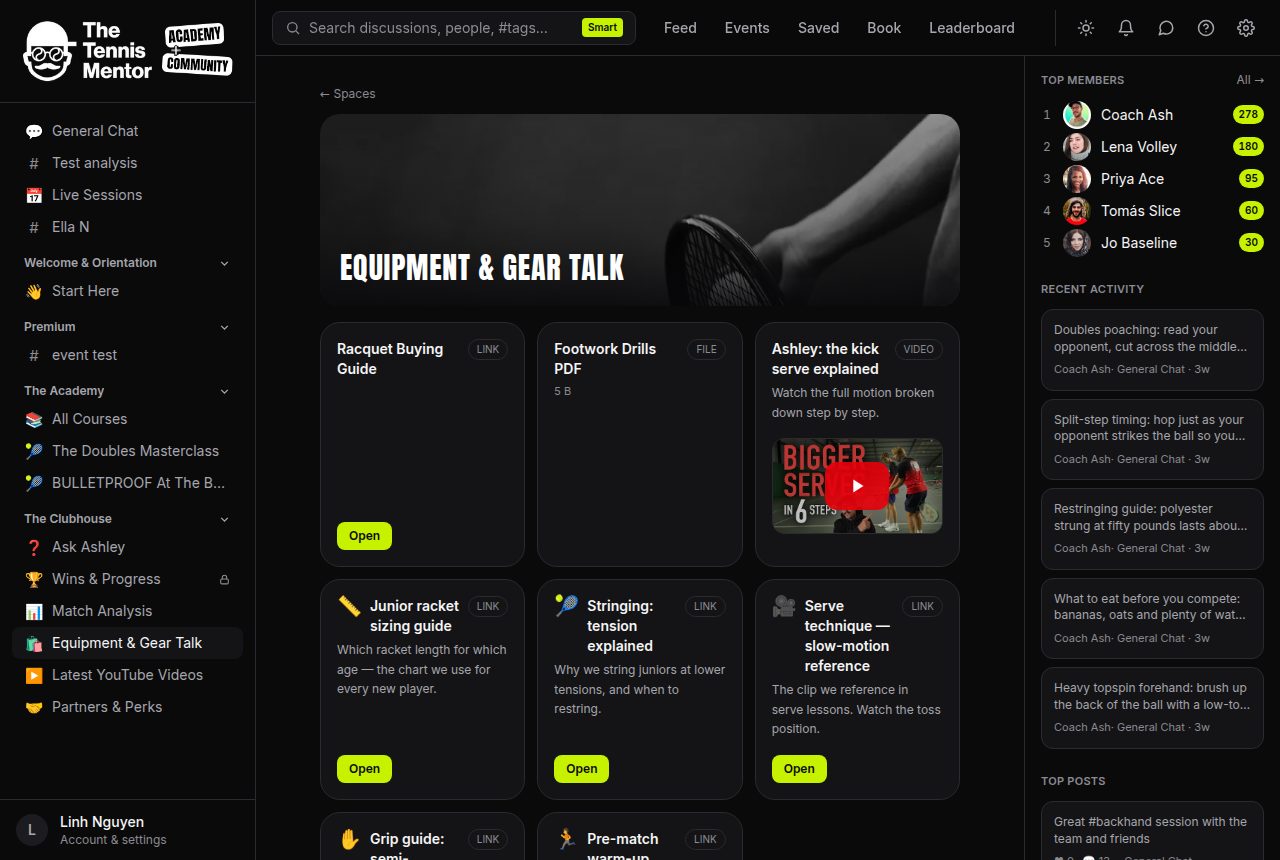
What you'll find
- Files — PDFs, worksheets, and anything else your coach has uploaded. The card shows the file size, and the Download button saves it to your device.
- Videos — YouTube videos embedded right on the card, so you can watch without leaving the community.
- Links — external websites and tools. Press Open to visit them.
Some resources are partner offers — those show a Get offer → button along with the deal and how to claim it.
How to use the library
- Open the resource space from your sidebar or the Spaces page.
- Browse the cards — each has a title, and usually a short description telling you what it's for.
- Press Download, Open or Get offer → on anything you want.
A note on access
You only see the resources in spaces you're a member of. If a resource space sits behind a paid tier, it works like any other premium space — you'll be shown how to unlock it rather than the contents. Download links are private and generated freshly for you each time you visit, so they can't be shared around outside the community.
If a space you've joined looks empty, it just means nothing has been added yet — new resources appear here as your coach uploads them, so it's worth checking back.