
For members
Controlling email
You're in charge of what reaches your inbox. In-app notifications always show in your Activity feed — these settings only control which of them also email you, in the periodic digest.
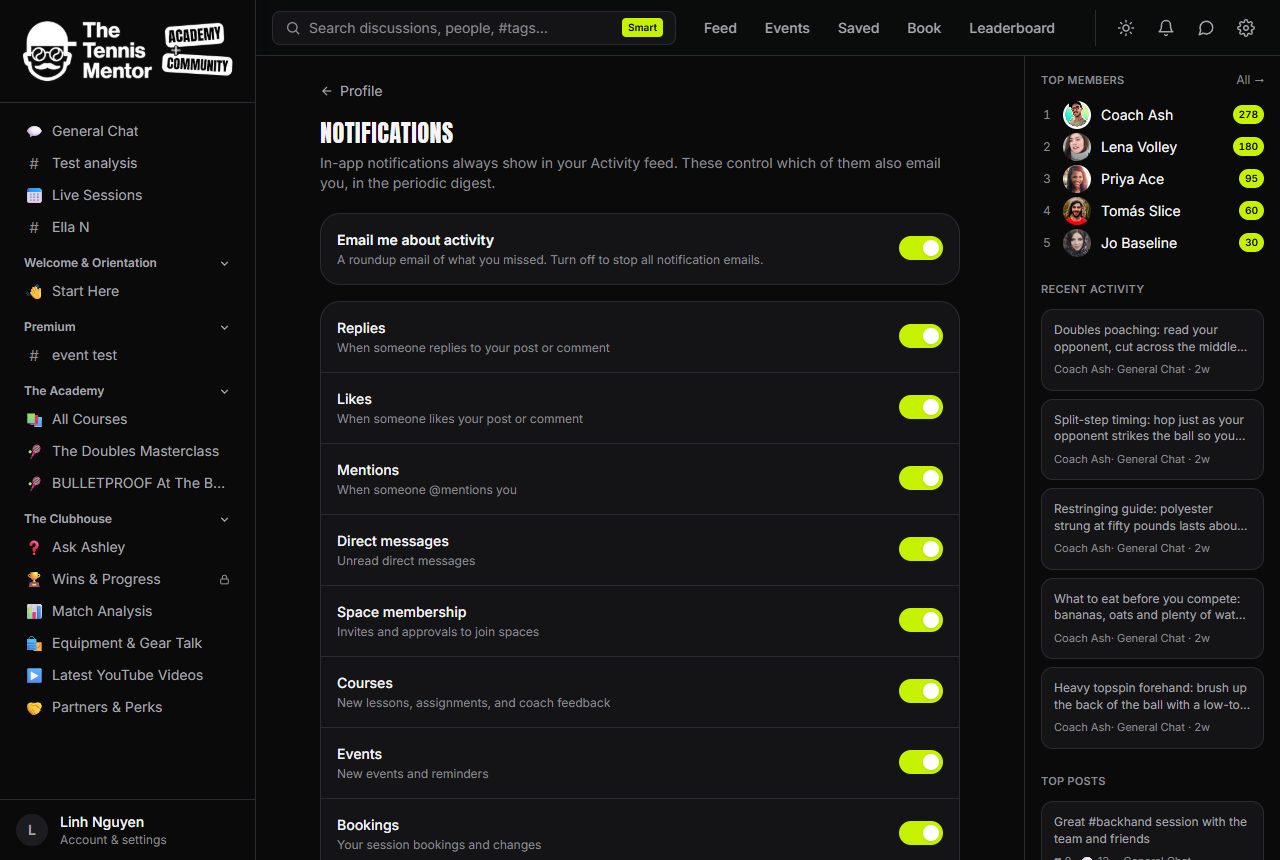
How to change your email settings
- Open your Profile (bottom of the sidebar, or the Profile tab on mobile).
- Go to the Notifications settings page.
- Flip the switches to taste — changes save instantly.
The master switch
Email me about activity is the big one. Turn it off and all notification emails stop — the category toggles below grey out, and your Activity feed carries on as normal inside the app.
The categories
With the master switch on, you can fine-tune by category:
- Replies — when someone replies to your post or comment
- Likes — when someone likes your post or comment
- Mentions — when someone @mentions you
- Direct messages — unread direct messages
- Space membership — invites and approvals to join spaces
- Courses — new lessons, assignments, and coach feedback
- Events — new events and reminders
- Bookings — your session bookings and changes
- Achievements — levels and milestones you reach
Switching a category off stops its emails only — those notifications still appear in the app.
What still arrives
A small set of emails can't be switched off, because you'd genuinely miss them:
Account and safety emails (sign-in links, moderation notices) are always sent.
That's it. Everything else respects your toggles, and because email comes as a digest of things you haven't already seen in the app, active members naturally get very little email at all — see How notifications work for the details.